إشعار
يتطلب الوصول إلى هذه الصفحة تخويلاً. يمكنك محاولة تسجيل الدخول أو تغيير الدلائل.
يتطلب الوصول إلى هذه الصفحة تخويلاً. يمكنك محاولة تغيير الدلائل.
Agents in Microsoft Agent Framework use a layered pipeline architecture to process requests. Understanding this architecture helps you customize agent behavior by adding middleware, context providers, or client-level modifications at the appropriate layer.
ChatClientAgent Pipeline

The ChatClientAgent builds a pipeline with three main layers:
- Agent middleware - Optional decorators that wrap the agent via
.Use()for logging, validation, or transformation - Context layer - Manages chat history (
ChatHistoryProvider) and injects additional context (AIContextProviders) - Chat client layer - The
IChatClientwith optional middleware decorators that handle LLM communication
When you call RunAsync(), your request flows through each layer in sequence.
Agent Pipeline
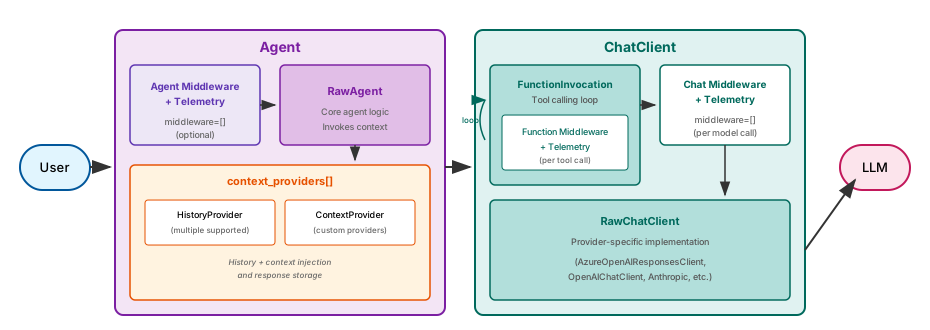
The Agent class builds a pipeline through class composition with two main components:
Agent (outer component):
- Agent Middleware + Telemetry - the
AgentMiddlewareLayerandAgentTelemetryLayerclasses handle middleware invocation and OpenTelemetry instrumentation - RawAgent - Core agent logic that invokes context providers and collects provider-added middleware
- Context Providers - Unified
context_providerslist manages history, additional context, and per-run chat/function middleware
ChatClient (separate and interchangeable component):
- FunctionInvocation - Handles tool calling loop, invoking Function Middleware + Telemetry per tool call
- Chat Middleware + Telemetry - Optional middleware chain and instrumentation layers, including any chat middleware added by context providers, running per model call
- RawChatClient - Provider-specific implementation (Azure OpenAI, OpenAI, Anthropic, etc.) that communicates with the LLM
When you call run(), your request flows through the Agent layers, then into the ChatClient pipeline for LLM communication.
Agent pipeline architecture

In Go, agents use a layered middleware pipeline. Middlewares wrap the agent's Run function, each calling next to pass control to the next layer.
When an agent runs, its lifecycle is applied in this order:
- Custom agent middleware - Your registered
agent.Config.Middlewares, applied in declaration order around the whole agent lifecycle - History provider - Loads prior messages and later stores request/response messages
- Context providers - Inject context, options, and state from registered
agent.ContextProviderinstances - Provider middleware - Provider-registered middleware such as tool auto-calling, structured outputs, and response authoring
- Provider - The underlying LLM provider, such as OpenAI or Anthropic
Agent middleware layer
Agent middleware intercepts every call to the agent's run method, allowing you to inspect or modify inputs and outputs.
Add middleware using the agent builder pattern:
var middlewareAgent = originalAgent
    .AsBuilder()
    .Use(runFunc: MyAgentMiddleware, runStreamingFunc: MyStreamingMiddleware)
    .Build();
You can also use MessageAIContextProvider as agent middleware to inject additional messages into the request. This works with any agent type, not just ChatClientAgent:
var contextAgent = originalAgent
    .AsBuilder()
    .UseAIContextProviders(new MyMessageContextProvider())
    .Build();
This layer wraps the entire agent execution, including context resolution and chat client calls.
This has benefits, in that these decorators can be used with any type of agent, e.g. A2AAgent or GitHubCopilotAgent, not just ChatClientAgent.
This also means that decorators at this level cannot necessarily make assumptions about the agent that it is decorating, meaning that it is restricted to customizing or affecting common functionality.
Add middleware when creating the agent:
from agent_framework import Agent

agent = Agent(
    client=my_client,
    instructions="You are helpful.",
    middleware=[my_middleware_func],
)
The Agent class inherits from AgentMiddlewareLayer, which handles middleware invocation before delegating to the core agent logic.
It also inherits from AgentTelemetryLayer which handles emitting spans, events and metrics to a configured OpenTelemetry backend.
Both of these layers, do nothing when they are not configured.
Add middleware by implementing the Middleware interface or using agent.MiddlewareFunc for lightweight middleware:
type Middleware interface {
    Run(next RunFunc, ctx context.Context, messages []*message.Message,
        options ...agent.Option) iter.Seq2[*agent.ResponseUpdate, error]
}
Each middleware receives the next function in the chain and can modify messages or options before calling next, process responses after calling next, or short-circuit the pipeline.
timing := agent.MiddlewareFunc(
    func(next agent.RunFunc, ctx context.Context, messages []*message.Message, options ...agent.Option) iter.Seq2[*agent.ResponseUpdate, error] {
        start := time.Now()
        return func(yield func(*agent.ResponseUpdate, error) bool) {
            defer log.Printf("agent run completed in %s", time.Since(start))
            for update, err := range next(ctx, messages, options...) {
                if !yield(update, err) {
                    return
                }
            }
        }
    },
)

a := foundryprovider.NewAgent(endpoint, token, foundryprovider.ModelDeployment(model), foundryprovider.AgentConfig{
    Config: agent.Config{
        Middlewares: []agent.Middleware{timing},
    },
})
For detailed middleware and observability patterns, see Agent Middleware and Observability.
Context layer
The context layer runs before each LLM call to build the full message history and inject additional context.
ChatClientAgent has two distinct provider types:
ChatHistoryProvider(single) - Manages conversation history storage and retrievalAIContextProviders(list) - Injects additional context like memories, retrieved documents, or dynamic instructions
var agent = new ChatClientAgent(chatClient, new ChatClientAgentOptions
{
    ChatHistoryProvider = new InMemoryChatHistoryProvider(),
    AIContextProviders = [new MyMemoryProvider(), new MyRagProvider()],
});
The agent calls each provider's InvokingAsync() method before sending messages to the chat client with each provider's output passed as input to the next provider.
The Agent class uses a unified context_providers list that can include both history providers and context providers:
from agent_framework import Agent, InMemoryHistoryProvider

agent = Agent(
    client=my_client,
    context_providers=[
        InMemoryHistoryProvider(),
        MyMemoryProvider(),
        MyRagProvider(),
    ],
)
Context providers can also attach chat or function middleware to a single invocation via SessionContext.extend_middleware(). The agent flattens those additions in provider order before entering the ChatClient pipeline.
Context providers run inside the agent lifecycle after custom middleware has entered the run and before provider middleware calls the model. Context providers can add messages or options before the provider call and persist state after the run.
a := foundryprovider.NewAgent(endpoint, token, foundryprovider.ModelDeployment(model), foundryprovider.AgentConfig{
    Config: agent.Config{
        ContextProviders: []agent.ContextProvider{memoryProvider},
    },
})
For detailed context provider patterns, see Context Providers.
Chat client layer
The chat client layer handles the actual communication with the LLM service.
ChatClientAgent uses an IChatClient instance, which can be decorated with additional middleware:
var chatClient = new AIProjectClient(endpoint, credential)
    .GetProjectOpenAIClient()
    .GetProjectResponsesClient()
    .AsIChatClient(deploymentName)
    .AsBuilder()
    .Use(CustomChatClientMiddleware)
    .Build();

var agent = new ChatClientAgent(chatClient, instructions: "You are helpful.");
You can also use AIContextProvider as chat client middleware to enrich messages, tools, and instructions at the client level. This must be used within the context of a running AIAgent:
var chatClient = new AIProjectClient(endpoint, credential)
    .GetProjectOpenAIClient()
    .GetProjectResponsesClient()
    .AsIChatClient(deploymentName)
    .AsBuilder()
    .UseAIContextProviders(new MyContextProvider())
    .Build();

var agent = new ChatClientAgent(chatClient, instructions: "You are helpful.");
By default, ChatClientAgent wraps the provided chat client with function-calling support. Set UseProvidedChatClientAsIs = true in options to skip this default wrapping.
The Agent class accepts any client that implements SupportsChatGetResponse. The ChatClient pipeline handles middleware, telemetry, function invocation, and provider-specific communication:
from agent_framework import Agent
from agent_framework.foundry import FoundryChatClient

client = FoundryChatClient(
    credential=credential,
    project_endpoint=endpoint,
    model=model,
)

agent = Agent(client=client, instructions="You are helpful.")
The RawChatClient within the ChatClient implements the provider-specific logic for communicating with different LLM services.
Provider middleware runs after history and context providers, immediately before the underlying LLM provider. Agent-level helpers such as OpenTelemetry and run logging are registered as custom agent middleware and wrap the earlier lifecycle steps.
| Component | Registration | Layer | Purpose |
|---|---|---|---|
| Auto-call | agent/harness/toolautocall |
Provider middleware | Automatically invokes function tools |
| Structured output | agent.WithStructuredOutput |
Provider middleware | Handles structured output parsing |
| OpenTelemetry | provider/otelprovider |
Agent middleware | Traces agent invocations |
| Run logger | agent.Config.Logger |
Agent middleware | Logs agent interactions |
agent.ContextProvider values are lifecycle components rather than agent.Middleware implementations. They run between custom agent middleware and provider middleware.
Execution flow
When you invoke an agent, the request flows through the pipeline:
- Agent middleware executes (if configured)
- ChatHistoryProvider loads conversation history into the request message list
- AIContextProviders add messages, tools, or instructions to the request
- IChatClient middleware executes (if decorated)
- IChatClient sends the request to the LLM
- Response flows back through the same layers
- ChatHistoryProvider and AIContextProviders are notified of new messages
Agent pipeline:
- Agent Middleware + Telemetry executes middleware (if configured) and records spans
- RawAgent invokes context providers to load history, add context, and collect provider-added chat/function middleware
- Request is passed to the ChatClient
ChatClient pipeline:
- FunctionInvocation manages the tool calling loop
- For each tool call, Function Middleware + Telemetry executes, including any function middleware added by context providers
- Chat Middleware + Telemetry executes per model call (if configured), including any chat middleware added by context providers
- RawChatClient handles provider-specific LLM communication
- Response flows back through the same layers
- Context providers are notified of new messages for storage
Note
Specialized agents may work differently to the pipeline described here.
- Custom agent middleware executes first and wraps the full agent lifecycle.
- History provider loads conversation history for the current session when local history is active.
- Context providers add messages, options, or state before the provider call.
- Provider middleware executes, including tool auto-call middleware and structured-output handling when enabled.
- The provider sends the request to the model.
- Response updates flow back through provider middleware and custom agent middleware.
- History providers and context providers store response state after a successful run.
Other agent types
Not all agents use the full ChatClientAgent pipeline. Agents like A2AAgent, GitHubCopilotAgent, or CopilotStudioAgent communicate with remote services rather than using a local IChatClient. However, they still support agent-level middleware.

Since these agents derive from AIAgent, you can use the same agent middleware patterns:
// Agent middleware works with any AIAgent
var a2aAgent = originalA2AAgent
    .AsBuilder()
    .Use(runFunc: LoggingMiddleware)
    .UseAIContextProviders(new MyMessageContextProvider())
    .Build();

// Same pattern works for GitHubCopilotAgent
var copilotAgent = originalCopilotAgent
    .AsBuilder()
    .Use(runFunc: AuditMiddleware)
    .Build();
Note
You cannot add chat client middleware to these agents because they don't use IChatClient.
Other agent types
Not every Python agent uses the full Agent + ChatClient pipeline. GitHubCopilotAgent, for example, sends requests through the GitHub Copilot CLI instead of a local chat client.
Even so, Python GitHubCopilotAgent still supports agent middleware and now runs context_providers around each invocation. Provider-added messages and instructions are included in the prompt sent to Copilot, and providers receive the matching after_run callback once a response is available.
Note
Because GitHubCopilotAgent does not use a local chat client, chat client middleware still does not apply.
Next steps
Related content
- Middleware - Add cross-cutting behavior to your agents
- Context Providers - Detailed patterns for history and context injection
- Running Agents - How to invoke agents